What Is Self Hosted File Storage?
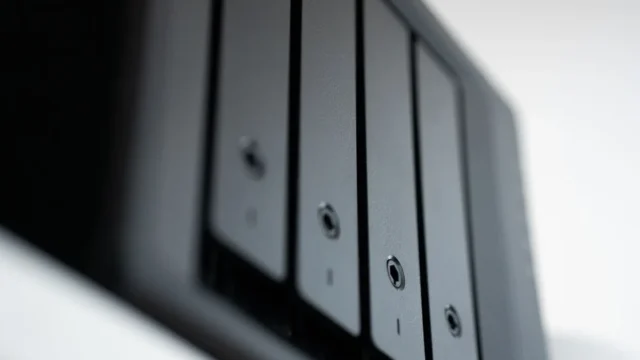
Self hosted file storage means keeping your files on hardware you control, such as a NAS, a home server or a rented server, and using software that adds cloud-style features like sync, sharing and remote access. You trade monthly fees and third-party access for responsibility: you handle updates, security and backups yourself.
| Option | What it is | Skill needed | Sync apps | Sharing links |
|---|---|---|---|---|
| NAS vendor apps | Synology Drive, QNAP Qsync | Low | Yes | Yes |
| Nextcloud | Full self-hosted cloud suite | Medium | Yes | Yes |
| Syncthing | Peer-to-peer folder sync | Low to medium | Yes | No |
| Resilio Sync | Peer-to-peer sync with placeholders | Low | Yes | Limited |
| Plain file shares (SMB, NFS) | Network folders | Low | No | No |
| Object storage you run | S3-compatible servers | High | Through other tools | Through other tools |
How Self Hosted File Storage Works
The storage layer is your hardware: disks in a NAS or server. On top sits software that turns it into a service.
- File sharing protocols like SMB let computers on your network open folders.
- Sync software keeps copies on your devices matched with the server.
- Web apps like Nextcloud provide a browser interface, sharing links and mobile apps.
- Remote access through a VPN, a vendor relay or your own domain lets you reach files away from home.
What It Means for Privacy
With self hosting, no provider holds a copy of your files or your encryption keys. That removes worries about provider scanning, policy changes and foreign data laws.
It also removes the provider’s security team. You must patch software, choose strong passwords, use two-step verification, and avoid exposing admin pages to the internet. In my experience, the biggest self-hosting risks are not clever attacks but forgotten updates and default passwords.
Our cloud privacy guide compares self hosting with end-to-end encrypted services.
Get the free sync troubleshooting checklist
One page with the settings and checks that prevent most sync and backup problems, plus alerts when a major service has an outage.
The Main Options in More Detail
NAS vendor apps
Synology and QNAP bundle sync, sharing and backup apps. They are the easiest route for most homes. Our cloud NAS hub compares them.
Nextcloud
Nextcloud is an open-source platform that gives you file sync, sharing, calendars, contacts and more on your own server. It has desktop and mobile apps and a large community. It suits people comfortable maintaining a web app.
Syncthing and Resilio Sync
These peer-to-peer tools sync folders between devices without a central server. Add an always-on device for a private cloud. See Syncthing cloud and Resilio Sync.
Common Myths
“Self hosted means safer.” Only if you maintain it. An unpatched server can be less safe than a major provider.
“I do not need backups because I own the hardware.” Hardware fails, and ransomware can reach network shares. Keep an offsite, versioned backup. See back up to the cloud.
“It is free.” Software may be free, but disks, electricity and your time are not.
“RAID is a backup.” RAID keeps the system running when one disk fails. It does not protect against deletion or corruption.
What to Check Before You Self Host
- Hardware: enough disks, ideally with redundancy, and a UPS for power cuts.
- Updates: automatic security updates where possible.
- Access: VPN or vendor relay rather than open admin ports.
- Backups: snapshots plus an encrypted offsite copy.
- Recovery plan: how you will restore if the server dies.
- Time: a realistic monthly maintenance budget.
Is Self Hosted File Storage Right for You?
Self hosting suits people with large libraries, strong privacy needs, or a love of tinkering. If you want zero maintenance, an end-to-end encrypted cloud service may be a better fit. Many people mix both: a NAS at home for big files, and a cloud backup for the offsite copy.
Start with our cloud NAS hub, set up device sync with NAS sync, and compare peer-to-peer tools in Resilio Sync vs Syncthing.
Frequently Asked Questions
What is the easiest way to self host file storage?
The easiest route is a NAS from a vendor like Synology or QNAP, which includes ready-made apps for sync, sharing, remote access and backup. You plug it in, add disks and follow a guided setup. Nextcloud and other self-built options offer more control but need more technical skill.
Is self hosted file storage more private than Google Drive?
It can be, because no provider holds your files or keys. Privacy then depends on your own security: updates, strong passwords, two-step verification and careful remote access. A poorly maintained server can expose files. End-to-end encrypted cloud services are a low-maintenance alternative with similar privacy.
Can I access self hosted storage from my phone?
Yes. NAS vendors and Nextcloud offer mobile apps for browsing, uploading and syncing files. Syncthing works on phones through community or third-party apps. For access away from home, set up the vendor’s relay service, a VPN, or a secure domain with HTTPS.
Do I need a backup if I self host?
Yes. Self hosting puts all your files on hardware you control, which can fail, be stolen or be hit by ransomware. Keep snapshots for quick rollback and an encrypted, versioned backup offsite, such as cloud object storage. This follows the 3-2-1 rule.
How much does self hosted file storage cost?
Costs include the NAS or server, the disks, electricity, and an offsite backup, plus your time. Upfront costs are higher than a cloud plan, but there is no monthly fee for local space. For large libraries, self hosting often costs less over several years than paying for equivalent cloud storage.
Keep your files safe and in sync
Join the newsletter for the free troubleshooting checklist and outage alerts. Facing a specific error? Tell us about it and we will point you to the right fix.
Sources